One app connects activities, observations, and next steps
Play whenever and wherever it works for your family
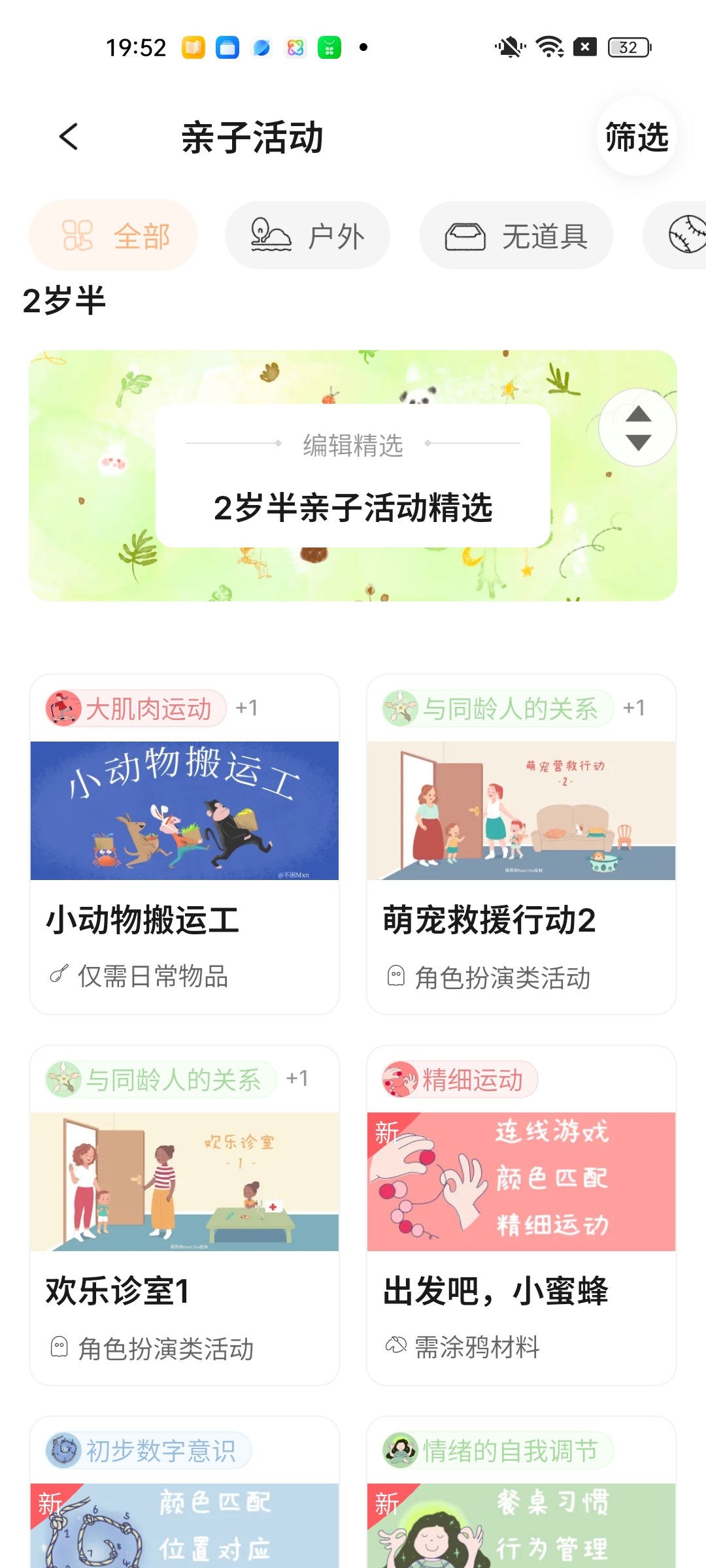
Activities for different ages, time windows, settings, and levels of preparation turn games, stories, movement, crafts, toys, and everyday routines into ways to begin. Each one explains how to play, why it was designed this way, and what may be most useful to notice.
Browse activities from birth to age 5
Through Play–Assess–Play, see how each moment together supports growth
After playing, briefly reflect on what happened in the activity and in daily life. Better Parenting uses the observation to understand the relevant ability more fully, explain what is now clearer, and connect it with a recommended next skill and activities.
Use the 4 + 31 framework to see the full picture and a next step
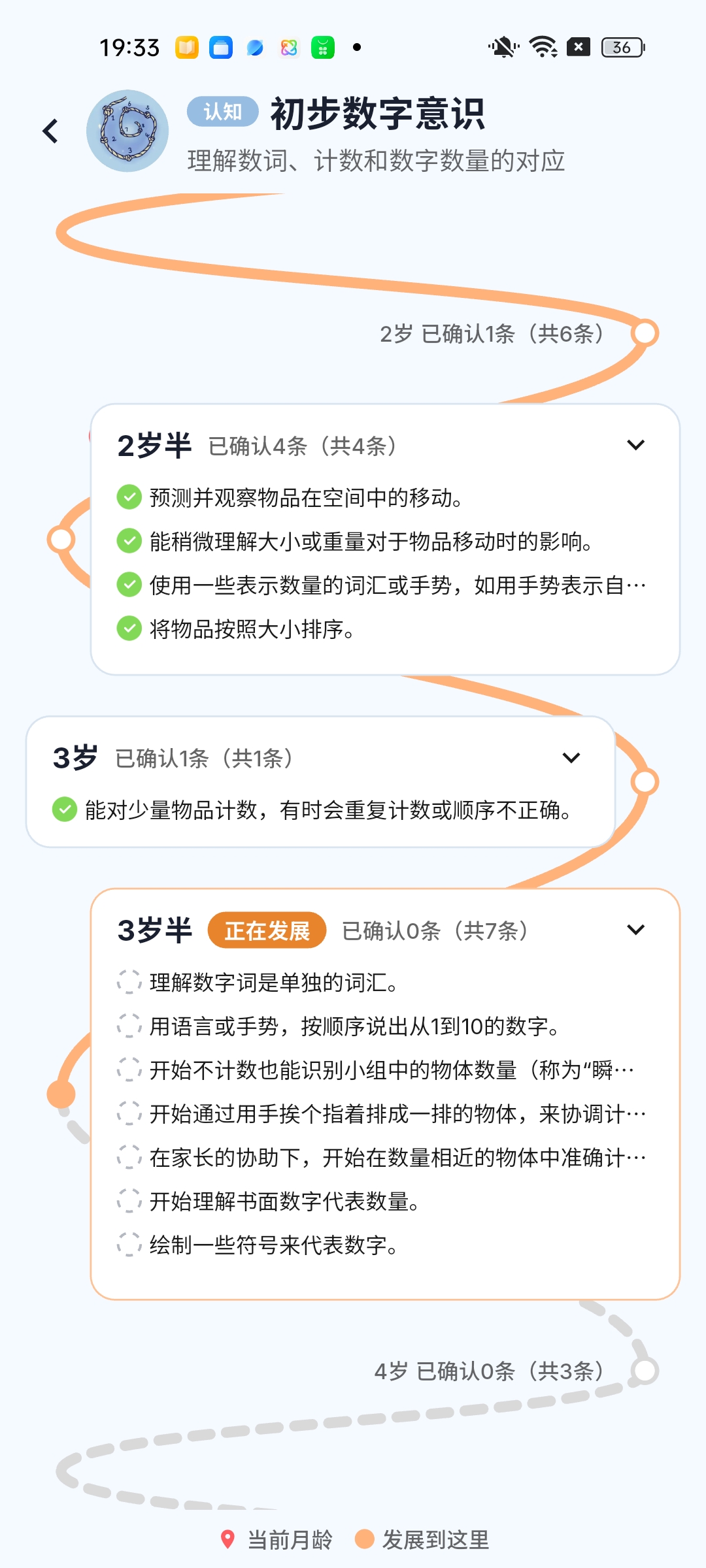
Better Parenting organizes development from birth to age 5 into four domains—Movement, Cognitive, Social/Emotional, and Language—and 31 sub-domains. Check age-based foundations, follow the Growth Path of one ability, see the four-domain overview, and find activities worth prioritizing next.
Explore four domains and 31 sub-domains
Begin with what you need now
1. Find an activity you can do today
Browse selected activities by age without completing an assessment or buying a table full of materials. Read the steps, interaction guidance, core observation, and developmental benefit directly on the website.
2. Turn one moment together into a new understanding
Begin with an activity. Afterward, complete the three-step reflection so that what you observed can contribute to the relevant ability and connect with a recommended next skill and activity.
See how Play–Assess–Play works
3. Spend less time choosing while supporting all four domains
Start with the four-domain development overview to see areas that may need support and strengths already emerging. The Growth Plan then turns the latest results into skills and activities worth focusing on this week.
Main entry: See what may be most worth doing this week
Understand the result first: Learn how to read the development overview
4. Check foundations for the current age
Review milestones across Movement, Cognitive, Social/Emotional, and Language development. When an item has not been observed, understand it, find natural opportunities to notice it, and follow any professional guidance attached to that specific milestone.
Learn about the Milestone Assessment
5. Follow the Growth Map into one ability
Choose one of 31 sub-domains. Use everyday observations to understand the current position and supporting evidence, then find a recommended next skill and related activities.
Find the next step for one ability
Every entry point helps you understand the same child
Activity reflection + Milestone Assessment + Skill Assessment
→ Understand the relevant sub-domains more fully
→ See the current position, evidence, and recommended next skill
→ Bring results together in the four-domain overview
→ Let the Growth Plan turn them into near-term activities
You do not need to complete everything at once. Begin with the question that matters today. When there is not enough information, Better Parenting should ask for more observation rather than pretend it already knows the answer.
See how Better Parenting turns observation into a next step
Which families may find Better Parenting useful?
- Families who want everyday time together to support development without turning home into a classroom;
- Parents who have saved a large amount of advice but do not know what fits their child now;
- Families who want both reassurance about age-based foundations and a fuller picture of development;
- Parents who want to continue developing interests and strengths, not only respond after a problem appears;
- Families who want less daily searching while keeping their own choices.
Current product facts
- Designed for parents and primary caregivers of children from birth to age 5;
- Covers four domains and 31 sub-domains;
- All app features are currently free;
- The app shows every currently available activity;
- The website reads the current activity count and fact date from one governed source instead of hard-coding a permanent number in copy.
Boundaries
Better Parenting relies on observations provided by parents. It does not automatically see the child, rank them against peers, identify talent, judge personality, make a medical diagnosis, or prescribe rehabilitation.
Activities create opportunities to try and observe. They cannot guarantee a developmental leap after one session. For concerns about health or development, read guidance attached to the relevant milestone and contact your child's pediatrician or another qualified healthcare professional.
Common questions
Do I have to begin with an activity?
No. An activity is often the easiest entry, but you may also begin with milestones, one sub-domain, the development overview, or the Growth Plan.
Why are the development overview and Growth Plan on separate pages?
The development overview answers, “How is my child doing across Movement, Cognitive, Social/Emotional, and Language?” The Growth Plan turns the latest results into near-term priorities and activities. They appear as one continuous experience in the app, but answer different questions.
Does Ahead for age mean my child is more intelligent?
No. It describes only the developmental level currently supported by observations in one sub-domain relative to the child's current age. It does not represent the whole child, intelligence, talent, or future achievement.
Understand first, then decide whether to download
Browse child-development knowledge and published activities directly on the website. Download Better Parenting when you want to see your own child's results, complete an assessment, reflect on an activity, or receive personalized suggestions.
- Keep browsing: Choose the task above that best fits your current need.
- Use your child's results: Download Better Parenting.